

Special firmware
KLSTR.rdm needs a special build at both ends of the USB cable, and this page is where you get both:
- On the nano, the sniffer firmware,
sniffer.klstr.nano. This is not the standard fixture firmware. Without it the nano never presents itself to KLSTR.ctrl as a connectable USB device, no matter how it is cabled. - On the PC, the usbNano build of KLSTR.ctrl. The standard build does not expose USB connected nanos, so the device never shows up at all.
Neither one is optional and neither is any use on its own. The flash itself happens over RDM, not over USB, using an ordinary RDM node and the normal firmware upgrade flow.
Who needs this page
Everyone. Both routes into KLSTR.rdm need both special builds:
| Your hardware | Hardware modification first |
|---|---|
| KLSTR.rdm box (bonano) | No, its USB is already broken out |
| KLSTR.dev board | Yes, see Use KLSTR.dev hardware |
The two special builds
sniffer.klstr.nano
usbNano build of KLSTR.ctrl
What you need
- A KLSTR.nano, either in a KLSTR.rdm box or on a modified KLSTR.dev board
- The
sniffer.klstr.nanobinary file - The usbNano build of KLSTR.ctrl, to connect to the nano once it is flashed (Windows, about 261 MB)
- A normal RDM node cabled to the nano's DMX IN or DMX OUT port.
- A PC running KLSTR.ctrl, any build is enough for the flash itself
Flash the firmware
Get the sniffer.klstr.nano binary
Download the firmware and keep it somewhere KLSTR.ctrl can reach during the upgrade.
Download sniffer.klstr.nano136 KB. Keep the filename exactly as it is, KLSTR.ctrl matches on it.
Cable an RDM node to the nano
Wire a normal RDM node to the DMX IN or DMX OUT port of the nano, exactly as you would for any other firmware update over RDM.
- Confirm the nano appears in your device list before continuing.
- The USB connection plays no part in this step.
Put the nano into firmware update mode
Press the firmware update button on the nano.
/images/klstr-rdm/nano-update-button.png.Run the update with the sniffer binary
In KLSTR.ctrl, open Upgrade Nano Firmware. The panel at the top shows the selected
image, so confirm it reads sniffer.klstr.nano before going further.
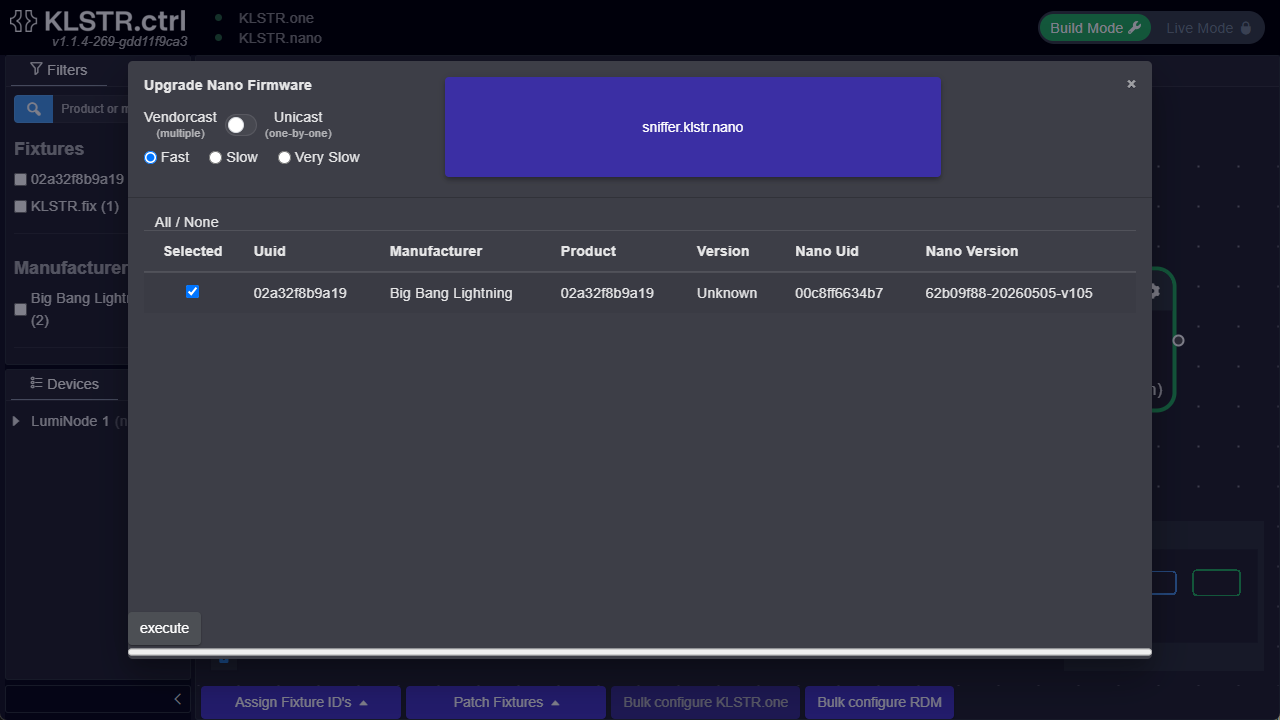
Then work left to right through the window:
- Vendorcast (multiple) or Unicast (one-by-one). Vendorcast updates every matching device at once, unicast walks them individually.
- Transfer speed, one of Fast, Slow or Very Slow. TODO: confirm when the slower rates are needed.
- Tick the nano you are flashing in the device table. The row shows its
Nano Uidand currentNano Version, which is the quickest way to be sure you have the right one.All / Noneselects the whole list. - Press execute, and let it finish and reboot. That is the whole flash.
Get the usbNano build of KLSTR.ctrl
The other half of the pair, this one on the PC. The standard build does not expose USB connected nanos, so without this build the nano simply never appears.
The build is a Windows package of roughly 261 MB, too large to serve from this site, so it is hosted on Google Drive.
Download the usbNano buildThe link opens a Drive folder holding a single file,
DEV-klstr-ctrl-windowsBuildDev-…-feat-rdmtester-ui-0f497edf….zip. Note that this is a
development build off the feat-rdmtester-ui branch, not a tagged release.
Connect the nano to the PC over USB
Plug the nano into the PC: the box's USB port for a KLSTR.rdm, or the USB-C receptacle for a modified KLSTR.dev board. Make sure you are running the usbNano build from the previous step.
Running the usbNano build, KLSTR.ctrl now shows the nano as a connectable USB device. This is the step where the second special build stops being optional: on the standard build the nano does not appear here at all.
Connect, and let the nano become an RDM controller
Connect to the device in KLSTR.ctrl. It is promoted from a plain device to a full RDM controller.
/images/klstr-rdm/ctrl-nano-connectable.png and
/images/klstr-rdm/ctrl-nano-as-rdm-controller.png.Verify it worked
The nano is correctly flashed and connected when all of the following are true:
- KLSTR.ctrl is the usbNano build, otherwise none of the rest can happen
- It appears in KLSTR.ctrl as a connectable USB device, not only as a DMX device
- Connecting to it presents it as an RDM controller
- Discovery, queries and sniffing are available from the controller view
What next
RDM-Compliance Testing
Troubleshooting
| Symptom | Most likely cause |
|---|---|
| Nano is visible in KLSTR.ctrl but never offered as a connectable USB device | Sniffer firmware not flashed, or the flash did not complete. Repeat the update |
| Nano does not appear in KLSTR.ctrl at all, even though the PC enumerated it | Wrong KLSTR.ctrl build. The usbNano build is required, the standard build never lists USB nanos |
| Firmware update never starts | The RDM node cannot reach the nano on DMX IN or DMX OUT. Recheck the cabling |
| Nothing appears over USB on a modified KLSTR.dev | The hardware modification is wrong, most often D+ / D- not crossed. See the hardware page |