

Use KLSTR.dev hardware
A KLSTR.rdm is just a KLSTR.nano whose USB is broken out to a PC, so a KLSTR.dev board can stand in for the boxed product. Remove two 0Ω resistors, add two jumpers, and the board's USB-C receptacle reaches the nano. This page is that modification.
If you have not met the KLSTR.rdm hardware yet, read the KLSTR.rdm introduction first.
What you need
- A KLSTR.dev board with a working KLSTR.nano.
- A soldering iron suitable for desoldering small 0 Ω links
- Two ordinary female to female jumper wires
Modify the board
On a stock KLSTR.dev board the nano's USB lines are not routed to the USB-C receptacle. Two changes fix that.
Remove the default 0 Ω resistors
The 0 Ω links hold the USB-C receptacle's data lines in their default assignment. Desolder them so the receptacle's data pins are free to be driven by the nano.
- Work with the board unpowered and unplugged.
- TODO: confirm the exact resistor designators to remove.
- Keep the resistors if you want the option of reverting the board later.
Jumper the nano USB lines to the USB-C receptacle
Use the female to female jumper wires between the nano's USB pins and the receptacle side.
+ / - silkscreen on the larger 5/6 double pin
header is not correct. Wiring D+ to D+ and D- to D- by the printed markings will
not enumerate. Cross them, and check your wiring against the image below before you
plug anything into a PC.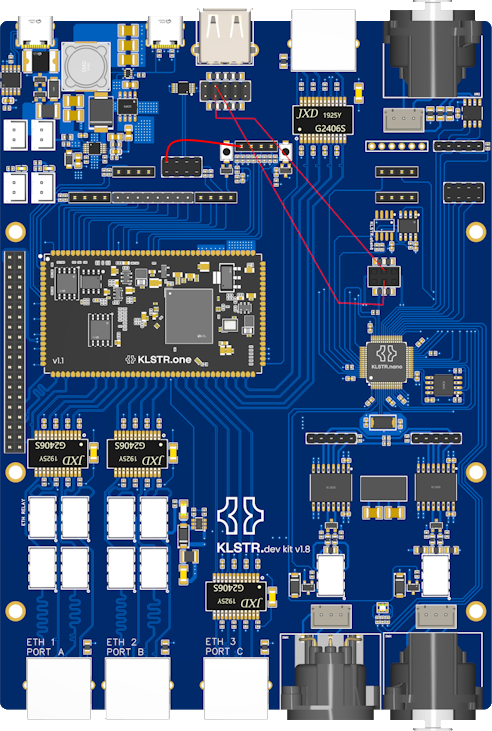
This image is the authoritative reference for the modification. The red lines are the jumpers to fit. Note that they cross. Also, the third red line conecting 2 pins on the board is an artifact of earlier KLSTR.dev harware revisions, upon which the KLSTR.one needed to be held in reset. This is no longer required and may be omitted.
With the resistors out and the jumpers crossed correctly, the nano is reachable over USB from a PC.
Check the nano is reachable
Plug the modified board into the PC with a USB-C cable before going any further. If the modification is good, two things follow.
- The PC enumerates a new USB device. It turns up in Device Manager on Windows,
in System Information → USB on macOS, or under
lsusbon Linux. TODO: confirm the device name and the VID/PID the nano presents. - The device shows up in KLSTR.ctrl. This needs the usbNano build, the standard build does not talk to a nano over USB at all.
If nothing appears on the PC at all, the crossed data lines are the first thing to re-check against the image above, then see Troubleshooting at the end of this page.
What next
The modified board is not a usable tool yet. Hardware was only the first of three requirements, and the other two are the pair of special builds:
- On the nano, the sniffer build. Until it runs, the nano will not present itself to KLSTR.ctrl as a connectable USB device.
- On the PC, the usbNano build of KLSTR.ctrl. Without it, KLSTR.ctrl never lists a USB nano in the first place.
Special firmware
sniffer.klstr.nano onto the nano, and run the usbNano
build of KLSTR.ctrl on the PC. Required for both the KLSTR.rdm box and a modified
KLSTR.dev board.Troubleshooting
| Symptom | Most likely cause |
|---|---|
| Nothing appears over USB after the modification | D+ / D- not crossed at the 5/6 double pin header, or the 0 Ω resistors are still fitted |
| The PC sees the board but KLSTR.ctrl does not list it | Wrong KLSTR.ctrl build. The usbNano build is required, the standard build never lists USB nanos |
| KLSTR.ctrl lists the board but never offers to connect | Expected at this stage. The sniffer firmware is not flashed yet |